


Campus Student is the kind of education app that can feel almost invisible when it is working well, yet surprisingly important when a family depends on it every day. I used it as a central place for school updates, assignments, attendance, grades, and schedules, and my first impression was practical rather than exciting: it reduces the need to search through separate messages, paper notices, and school portals. That straightforward purpose is also its biggest strength. It earns its place through repeated usefulness, not novelty.
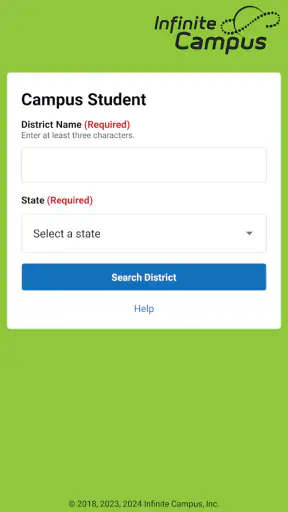
Developed by Infinite Campus, Inc., this free app is aimed at students and families who use the Infinite Campus school system. It is available for everyone, and the Android release works from version 7.0 onward. The current version is 1.12.3, while the app has been available since September 20, 2018. Those details matter less than one basic condition: your school must use the Infinite Campus platform. If it does not, Campus Student is not a general-purpose school organizer that you can simply configure for any institution.
From a useful first week to a dependable school habit
The first-week appeal is immediate access to school basics
During the first week, the app is easy to appreciate because it brings together the information people usually need most urgently. Instead of asking a student to remember several teacher announcements or a parent to locate a message from school, Campus Student gives them a place to check announcements, assignments, attendance, grades, and schedules. The value is especially clear at the beginning of a term, when routines are still unsettled and everyone is figuring out where each class belongs.
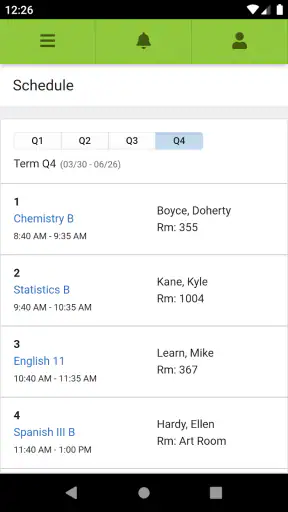
I found the schedule view more useful than it may sound. A schedule is not just a timetable; it is a quick way to confirm what should happen next, particularly on a busy morning or after a change in routine. Students can use it before leaving home, while parents can use it to understand the shape of the school day without opening a full browser portal. That small reduction in uncertainty is one reason the app feels helpful almost immediately.
Assignments are another strong starting point. A student who is unsure whether work was posted can check the app rather than relying on memory or waiting for a classmate to respond. Parents also gain a clearer view of what is expected, although I would not treat the app as a replacement for talking with a student about priorities, deadlines, or difficulty. It shows school information; it does not automatically turn that information into a sensible study plan.
Announcements are useful when a family wants one place to look for general school communication. The practical tip here is to make checking the app part of an existing routine, such as looking at it after the school day rather than opening it repeatedly without a purpose. Campus Student becomes less distracting when it is used as a brief information check instead of a feed that demands constant attention.
The app’s free price also removes an obvious barrier. A student or parent does not need to decide whether a subscription is worth maintaining, which makes it easier to keep installed even during quieter periods. Its broad adoption, with over a million installs and an average rating of 3.6 from around seven thousand ratings, suggests a mixed but substantial real-world presence. I read that rating as a reminder to keep expectations realistic: the app is useful, but the experience may depend heavily on how a particular school configures and uses the underlying system.
A realistic school-day scenario
Imagine a student arriving home after a crowded day and remembering only that something was due soon. Opening Campus Student can answer several immediate questions: which class is next, whether an assignment appears in the school record, and whether the student’s attendance information looks correct. A parent who is trying to help can check the same general areas without sorting through a child’s entire backpack or asking for several screenshots.
That scenario shows the app at its best. It does not need elaborate tools to be valuable. A reliable central record can prevent small misunderstandings from becoming larger ones. If a student believes an assignment was never posted, or a parent thinks an absence was recorded incorrectly, the app gives both sides a common place to begin the conversation.
My advice is to use that shared view carefully. A displayed grade or attendance entry is useful evidence, but it is not always the complete story behind a teacher’s decision. When something looks wrong, the healthiest workflow is to note the class and item, then contact the school through its normal channel rather than repeatedly refreshing the app or assuming the display explains everything.
What remains valuable after the novelty fades
After the first few weeks, the excitement of having everything in one app naturally disappears. That is not a weakness by itself. The important question becomes whether Campus Student still saves time month after month. In my experience, it does when the user treats it as a quick reference tool instead of expecting it to manage the entire academic life.
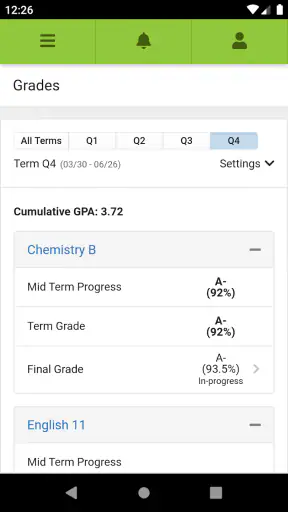
Grades are the clearest example. Checking them occasionally can help a student notice a pattern early, such as several results in one subject arriving lower than expected. For parents, the app can make it easier to discuss progress before a report period creates a surprise. The trade-off is emotional: frequent checking can turn the app into a source of anxiety, especially when a single incomplete item appears more alarming than it really is. I recommend looking for trends and missing work rather than judging every individual update in isolation.
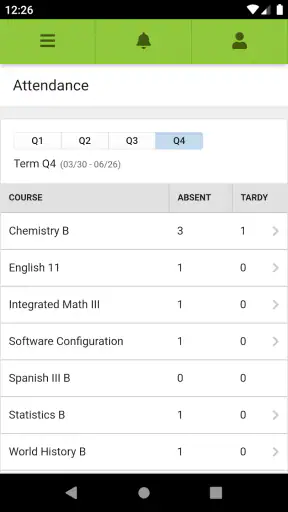
Attendance has a similar long-term role. It is not a feature most people want to open for entertainment, but it becomes important when records need to be reviewed. A useful habit is to glance at attendance after an absence or late arrival, while the details are still fresh. That makes it easier to notice a discrepancy promptly instead of discovering it much later, when reconstructing the day is harder.
Assignments give the app recurring value for students who do not already have a strong planning system. I would not copy every item into a second task manager automatically; duplicate entry creates maintenance work and can lead to conflicting deadlines. A better approach is to use Campus Student as the source of truth for what the school has posted, then transfer only the most important items into a personal planner if extra reminders or time blocks are needed.
This distinction is one of the app’s most important trade-offs. Campus Student is good at showing school information in context. It is less suited to replacing a dedicated planner, note-taking app, calendar system, or communication tool. If you want detailed task breakdowns, custom labels, study timers, or long-term project planning, another app will probably do that job better. Campus Student works best alongside those tools, not as a complete substitute for them.
Maintenance is light, but the school connection matters
The maintenance burden is relatively small for ordinary users. The app is free, and there is no need to build a complicated personal database inside it. Most of the ongoing work is behavioral: remember to check it, keep the correct school account available, and avoid treating every new entry as an emergency. That makes it easier to keep installed through an entire school year than an app that requires constant manual organization.
Still, “low maintenance” does not mean “no friction.” A family may have more than one student, and moving between student information can make the experience feel less immediate than a simple personal dashboard. A parent may also need to decide how often to check without creating a sense of surveillance. The app can support a conversation about school, but it should not become the only conversation.
Another practical limitation is that the quality of the information depends on the school’s use of Infinite Campus. If a teacher posts late, updates a grade later, or communicates an exception elsewhere, Campus Student cannot repair that gap. This is an important distinction when judging the app fairly: a central portal can display the record it receives, but it cannot guarantee that every school process is equally timely or complete.
For that reason, I would not uninstall the app simply because one item seems outdated. First, check whether the issue is limited to one class or record. If it is, the better next step is usually to contact the teacher or school office. The app remains useful for the rest of the information even when one entry needs clarification.
On Android, the minimum operating system requirement is version 7.0. That makes the app accessible on many older devices, although actual comfort will still depend on the phone’s condition and the way the school account is set up. The important long-term point is that users should keep the app updated when updates are available, because an education portal is more useful when it remains compatible with the changing school environment.
Where fatigue starts to appear
The main source of fatigue is not a complicated feature set; it is repetition without clear priority. Students may see assignments, announcements, grades, and attendance in the same general environment, but not every item deserves equal attention. If you open the app several times a day just to look for change, it can begin to feel like another obligation. A scheduled check is usually more sustainable than constant monitoring.
Parents can experience a different kind of fatigue. Having access to school information can be reassuring, but it can also encourage checking grades or attendance more often than necessary. I think the app works better when families agree on what deserves immediate attention and what can wait for a weekly conversation. That approach protects the useful transparency without allowing the portal to dominate home life.
Students who already rely on a school website may also wonder whether the separate app is worth keeping. The answer depends on how often they use a phone during the school day. A browser portal may be better for extended review, printing, or comparing several pieces of information at once. Campus Student is more convenient for short checks, especially when the goal is simply to confirm a schedule, assignment, announcement, grade, or attendance entry.
It is also not the right choice for someone looking for a full learning platform. It does not replace classroom instruction, direct teacher communication, file-based study tools, or a dedicated system for organizing notes. A student who wants lessons, flashcards, practice questions, and progress coaching should choose an education app designed around those activities. Campus Student belongs to the administrative and tracking side of education, not the teaching side.
The average rating of 3.6 indicates that convenience does not eliminate frustration. I would interpret that as a reason to judge the app in context rather than dismiss it immediately. If your school relies on Infinite Campus and keeps its records current, the app may be genuinely useful even if the interface is not your favorite. If your school rarely updates the system, the app will feel disappointing no matter how often you open it.
Small workflows that make it more useful
One helpful workflow is a two-minute evening review. I would check the next day’s schedule, scan for newly posted assignments, and look at announcements that could affect the morning. This is more efficient than trying to reconstruct the entire week from memory, and it keeps the app’s role narrow enough to maintain.
A second workflow is to use attendance as a prompt for record-keeping. When a student misses school, note the date and reason privately, then compare that memory with the attendance entry once it appears. This does not require constant checking, but it creates a simple way to catch errors while details are still easy to verify.
A third insight is to separate information gathering from emotional judgment. A new grade is a fact to understand, not automatically a verdict on a student’s ability. Looking at the assignment, the surrounding grades, and the student’s own explanation produces a better response than reacting to one number immediately. Campus Student makes that first piece of information easy to find, but the interpretation still belongs to the family and school.
For parents with multiple school-age children, a consistent review routine can prevent one student’s updates from receiving all the attention. Check each student’s schedule and recent changes in the same order, then stop. This is a small habit, but it reduces the temptation to keep reopening the app because something may have been missed.
Who should keep it installed?
I would recommend Campus Student to students who need a dependable view of school logistics and to parents who want a practical way to follow assignments, attendance, grades, schedules, and announcements. It is especially suitable for families that prefer a short daily check over a more elaborate planning system. The fact that it is free and rated for everyone also makes it an easy addition to a family’s basic school toolkit.
I would be more cautious for students who already have a strong workflow built around a school website, calendar, and task manager. Installing another place to check can create duplication rather than clarity. In that case, the app is worth keeping only if its mobile access is noticeably faster or more convenient than the existing routine.
I would also skip it as a primary tool if your goal is active learning. It will not replace a revision app, digital notebook, tutoring service, or teacher conversation. Its strength is visibility into school records and communication, so choosing it for a different purpose would lead to disappointment.
My long-term verdict
Campus Student succeeds because its recurring value is easy to understand. It gives students and families a shared reference point for the ordinary details that shape a school week. The app does not need to be opened constantly, and it does not need to become the center of a family’s routine. In fact, it is healthier and more useful when it stays in the background until there is a genuine reason to check.
After the first-week appeal fades, I still see a reason to keep Campus Student installed when a school actively uses Infinite Campus. The app’s lasting benefit comes from reducing small uncertainties: what is scheduled, what has been assigned, what has been recorded, and what may need a follow-up. That is modest value, but it repeats throughout the school year.
My final recommendation is to give it a fair trial within your actual school routine, then judge it by whether it saves time after the novelty is gone. Use it for quick checks, avoid duplicating every item in another planner, and contact the school when a record needs explanation. For families connected to the right school system, it earns a permanent place as a practical education companion. For everyone else, a general calendar, planner, or learning app will be a better fit.


